
Langoor finds your files via a recursive function that digs all your files ending with ".test.js".
Just type this in the console!
# auto-searches files ending with ".test.js"
langoor
# if you wanna add additional files to the pre-existing ones
langoor [file_path]
// PASS
test("string `test` should be strict equal to `test`", () => {
hope("test").toStrictEqual("test");
});
// FAIL
test("adding 1 + 2 will give 4", () => {
hope(1 + 2).toStrictEqual(4);
});
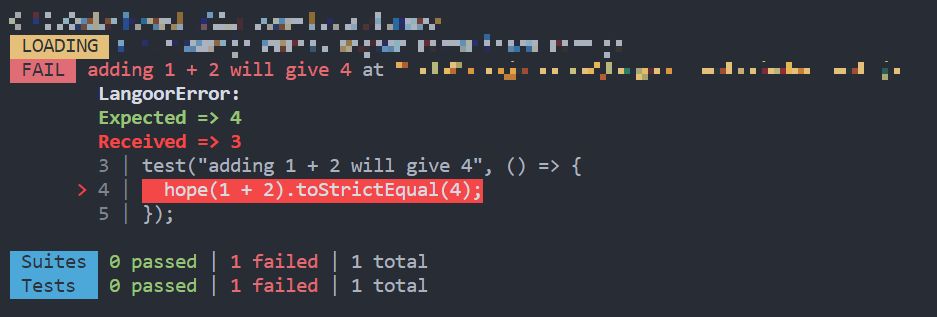
The most common and useful one is
toBe
which uses
Object.is
equality.
Other ones are
toEqual
which uses
==
to check equality, whereas
toStrictEqual
uses
===
.
// Use in a test function!!
// toBe
hope(":D").toBe(":D"); // pass
hope(1).toBe("1"); // fail
// toEqual
hope(1).toEqual("1"); // pass
hope(":)").toEqual("1"); // fail
// toStrictEqual
hope("hey").toBe("hey"); // pass
hope(12).toBe("12"); // fail
1.
toBeArray
- Check if type is array
2.
toBeObject
- Check if type is object
3.
toBeString
- Check if type is string
4.
toBeNumber
- Check if type is number
5.
toBeDefined
- Check if value is defined
6.
toBeNotNull
- Check if value is not null
7.
toBeTrue
- Check if type is true
8.
toBeFalse
- Check if type is false
// Use in a test function!!
// toBeArray
hope([":)", ";)"]).toBeArray(); // pass
// toBeObject
hope("hello!").toBeObject(); // fail
// toBeString
hope(1).toBeString(); // fail
// toBeNumber
hope(1).toBeNumber(); // pass
// toBeDefined
hope(1).toBeDefined(); // pass
// toBeNotNull
hope(null).toBeNotNull(); // fail
// toBeTrue
hope(true).toBeTrue(); // pass
// toBeFalse
hope(true).toBeFalse(); // fail
1.
toThrow
- Input a function and check if it throws an error
2.
toContainProperty
- Check if input (type object) contains property
3.
toReturnValue
- Input a function and check if it returns a value
4.
toRegexMatch
- Check if string matches with given regexp
// Use in a test function!!
// toThrow
hope(() => {
throw new Error("whoops!");
}).toThrow(); // pass
// toContainProperty
hope({ greeting: "heya!" }).toContainProperty("greeting"); // pass
// toReturnValue
hope(() => {
let a = 1;
}).toReturnValue(); // fail
// toRegexMatch
hope("let's go!").toRegexMatch(/go/g); // pass